AI Classroom Policy Suggestions
Leave a commentApril 18, 2026 by Dr. Robbie Barber
This past week, I attended the Annual GALILEO Conference and enjoyed my sessions immensely. Most of the sessions involved artificial intelligence (AI) in some part of the discussions. Late in the afternoon, I went to one session about LibGuides and talked to Will Jones & Tess Lyle, Technical Services Librarians, at Richmont Graduate University. They had the concept that we should start our AI policies by telling students what was allowed instead of starting with what isn’t allowed. This shouldn’t be mind-blowing, but sometimes, looking at something from a different viewpoint, coalesces our thinking. Between that simple suggestion, other things heard at the conference, and other past discussions with teachers in my school, I had the idea for an AI Classroom Policy. The key is that I want some clear guidelines that students, parents, and teachers can understand easily. In a frantic three days, I created a chart, checked with other high school librarians, checked with teachers, asked students, and came up with an image. It is not perfect or final, but it is usable.
AI Classroom Policies should include what students can use without asking, what students can use with an instructor’s permission, and what students are not allowed to use. One request by a teacher was to simplify or remove wording and replace with images when possible. I also wanted the policy to be as specific as possible in what could be used. I didn’t want to use a lot of language that confused the teacher or student.

GREEN LIGHT: Useable AI
One of AI’s strengths is accessibility. I teach my low readers and ESOL students to use the Text-to-Speech options when possible. Depending on the software, many of them highlight the words or phrases as they speak them aloud. It helps these students access higher-level materials then they may be able to read, but can still understand.
Additionally, when my ESOL students are learning how to do research, I encourage them to use translation software. I do not want their understanding to be limited to their level of success in English. I want them to understand the process and materials to be able to write a research paper.
YELLOW LIGHT: Use with Instructor’s Permission
Our school district has contracts with Microsoft for Education and Google for Education. Both come with policies protecting student data. Therefore the list here includes Copilot and Gemini. But, to be clear, these softwares are only allowed to students if they have an instructor’s permission AND if they use their school account.
Many AI systems have the Speech-to-Text also. It’s under the ‘Caution’ section because they do not do a perfect job. Every word has to be checked. But it does work and I have students with accessibility issues that need to use it. Just be cautious.

RED LIGHT: Don’t Use. Period.
Read the privacy policies. Chat GPT says it can be used by students under 18 yrs old with parental permission. Do you have their permission on file? If not, do not use it. Claude’s privacy policy says it is not intended for use for anyone under 18.
Another high school librarian said we should explicitly add that no one could use AI to do their assignment, but they could (with permission) check their assignment. The sad reality is that it is hard to catch students using AI to complete assignments. If we have a policy to help guide them, maybe we can manage this better.
Read the privacy policies. If the student data isn’t protected, don’t use it. Do not upload any student or teacher information.
Remember, that when we use AI, we need to cite it. AI is a source, not a final authority. At the conference, I heard the line that one problem with AI is that it talks in an authoritative tone. It sounds like it is right, even when it is absolutely wrong.
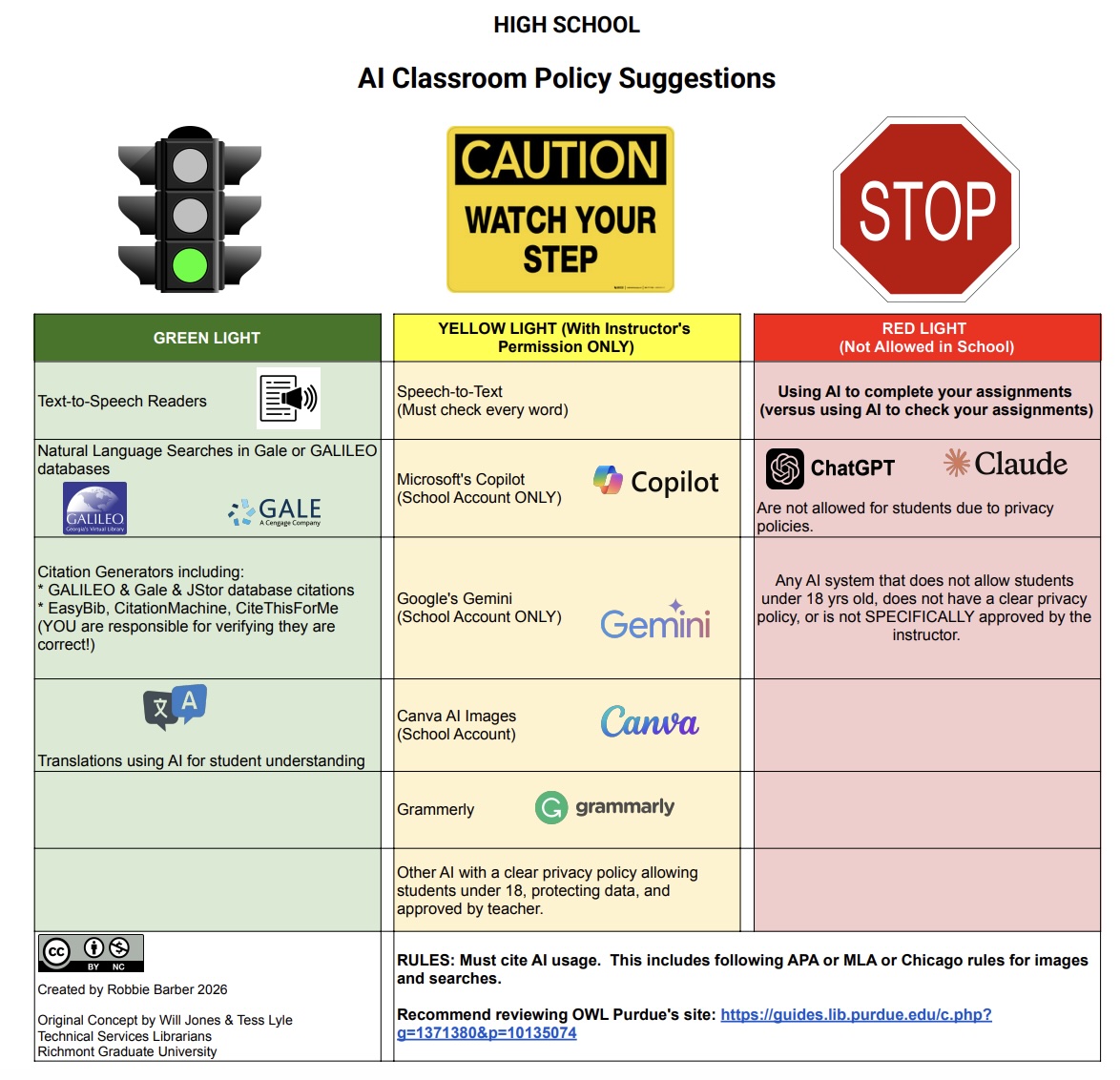
Everyone has their own specifics of what to use. One student suggested Grammarly be in the Green since her teacher had taught everyone how to use it. I pointed out that using it is still a teacher pre-requisite. If a teacher taught you to use it, then in that teacher’s classroom only(!), you had permission to use it.
School librarians (Media Specialists, Teacher-Librarians, METIs, etc.) are a part of an school’s academic team. We are actively trying to help with information overload and find ways to help our patrons understand their choices.
To view and make your copy, click here. Be sure to maintain the copyright information in the bottom left-hand corner as you make your own changes.
Happy School Librarian Month!

